Make life easier.
Mise en place.
Everything in place.
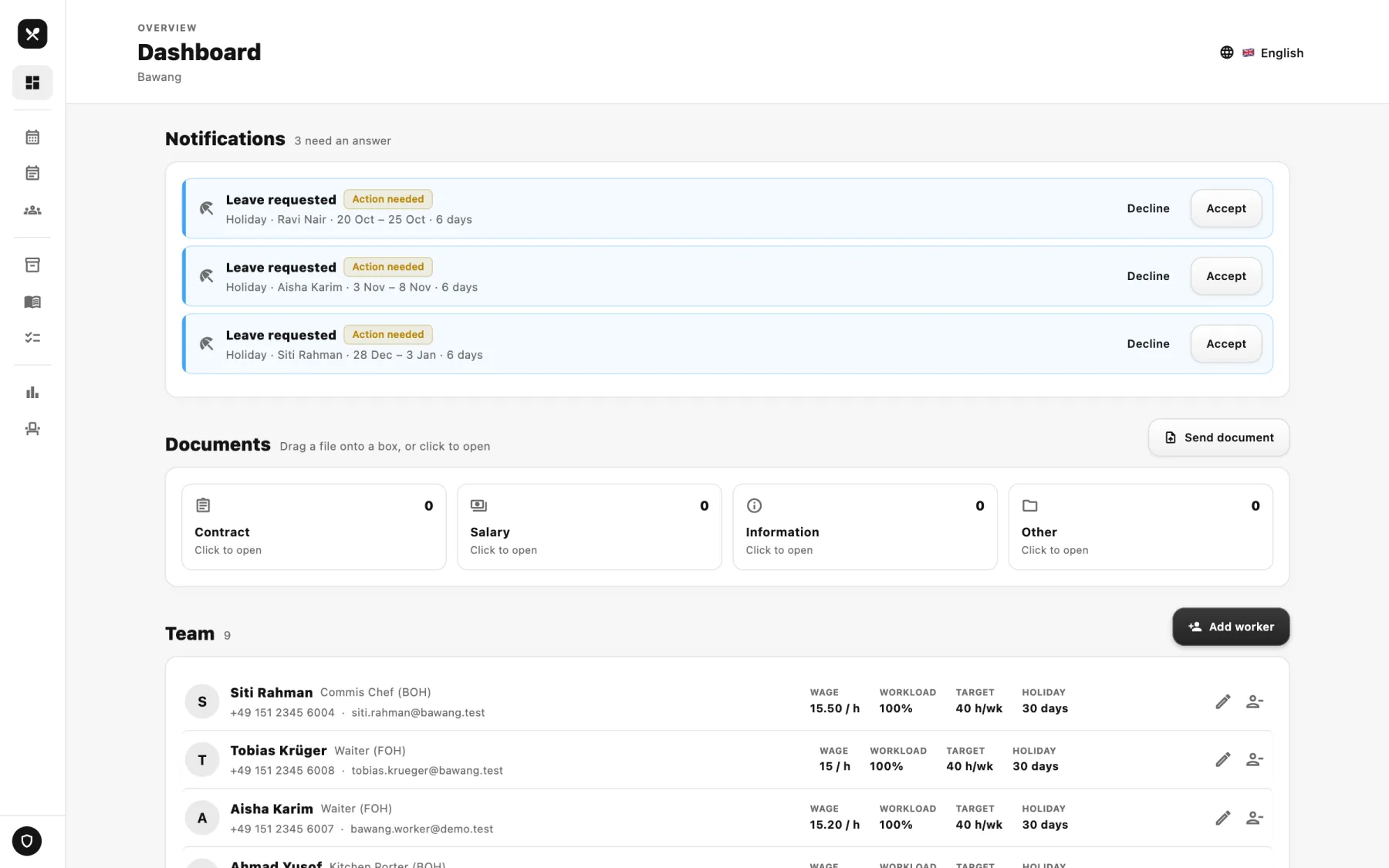
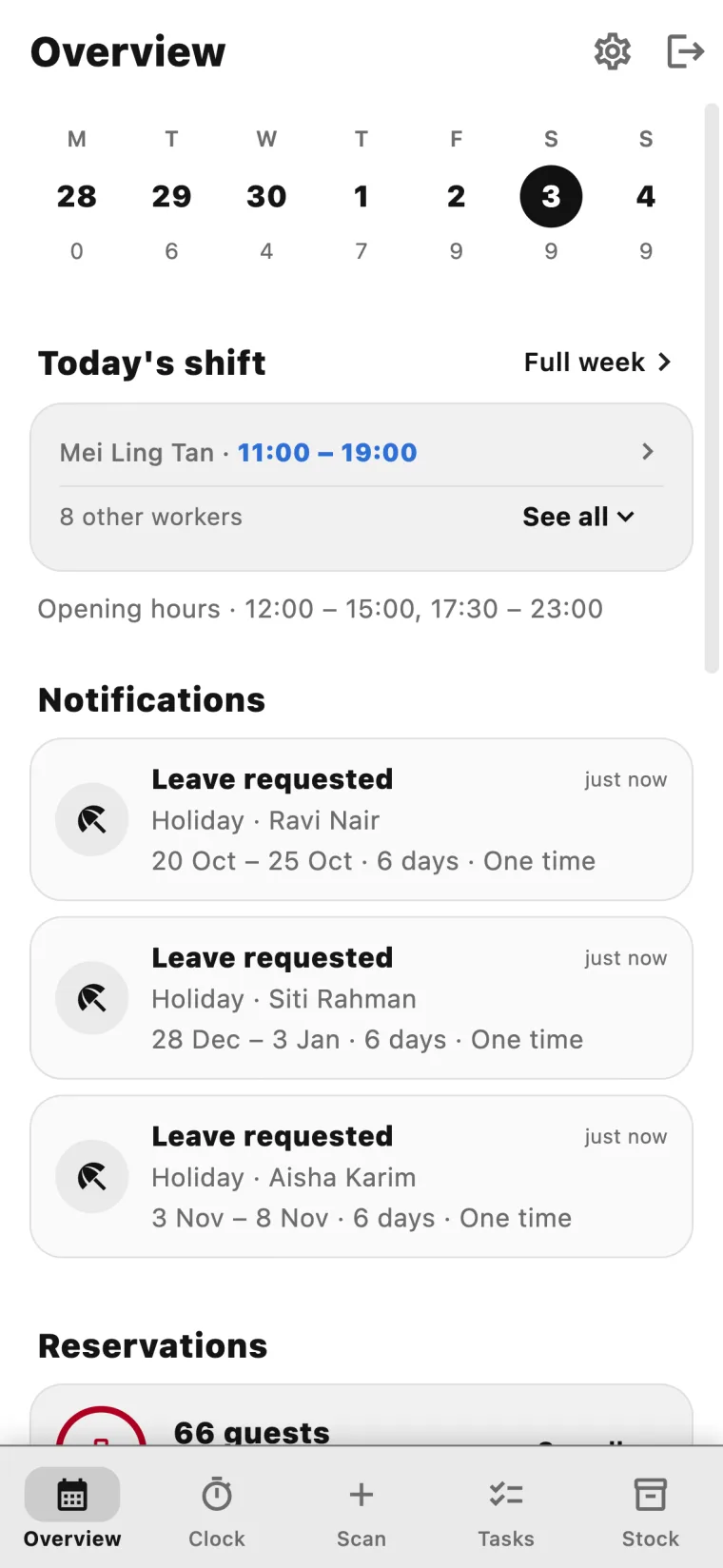
Easy to set up. Even easier to use. One app that combines your entire back office. Run it from your phone, check the whole picture on your laptop.
First month free. Cancel anytime. No setup fee.
Eight things it does
Everything a small kitchen needs. Nothing it doesn't.
- 01
Scan instead of type
Photograph a menu, an invoice or a receipt. The app reads the items, prices and quantities and sets it all up for you — you check it over once and confirm.
- 02
Dynamic scheduling
You create the shifts. Your team asks for leave. The weekly schedule keeps up with every change and everyone has the current version — in the app, or downloaded as a PDF.
- 03
Check your inventory
A daily list to walk your storage, sorted by where things actually live. One tap to confirm, one tap to add to purchasing, and you can always see who has checked already. Nothing gets missed.
- 04
Shopping list
Call the supplier straight from the list, then mark it done with one tap. No clipboard, no scribbled notes, no paperwork to type up afterwards.
- 05
Clock in, clock out
One button to clock in and out. Net hours are counted as you go, so everyone can see where the week stands without anyone adding it up.
- 06
Sales without the data entry
Scan the day's sales receipts and your supplier invoices with your phone. Then sit down at your laptop and read the restaurant's figures back, without typing any of it in twice.
- 07
Shared to-do list
One to-do list for the whole team. Assign a job to a person or leave it open to whoever gets there first, and mark it complete when it's done.
- 08
Weekly overview
Shifts, working hours, opening hours, leave and sick days — all on one shared overview, so the whole week is legible at a glance.
From a photo of your menu to a running kitchen.
Set up within minutes
Scan your menu. Scan your supplier invoices. Add your team, assign their first shifts, fill in your restaurant details. That's it — you're open for business.
Run day to day from your phone
The whole team runs the day to day straight from the app in their pocket — inventory, sales, tasks, hours and shifts, recorded by whoever is already standing there.
Control everything from your laptop
Open the desktop version for the whole picture: your analytics, your entire schedule, your numbers and metrics — and the categories, which you set up however your restaurant actually works.
Benefits
What changes once it's all in one place
Seven things that get easier. Move over a plate — or tap it — to see each one.

Hover a number · tap it on a phone
A day with it
The same day, from both sides
The floor runs the day from a phone. The office reads it back on a laptop. Switch between them.
- 06:40
The delivery lands
Photograph the delivery note and the items, quantities and prices come back as a draft to confirm.
- 09:15
Prep and the inventory check
Walk the fridges and the dry store, tick off what's there, and add anything short straight to purchasing.
- 11:30
The team clocks in
One button each. Net hours count themselves from there.
- 12:00
Lunch service
The day's tasks sit on the same screen as everything else — tick them off as they're done.
- 16:00
The quiet hour
Scan the lunch receipts, check tomorrow's shift, send a leave request from your own phone.
- 18:30
Dinner service
Everyone on shift can see who else is on and what's still outstanding, without asking.
- 23:10
Cashing up
Photograph the day's receipts. The takings are recorded before the last table leaves.
- 00:20
Clock out
Tomorrow's shopping list is already waiting. Lights off.
Showing: On the floor
Owner & chef
The full picture
- Scan menus, invoices and receipts
- Build the schedule and approve leave
- Read the restaurant's sales and hours
- Run purchasing and keep the categories tidy
Your team
Just their part, on their phone
- Record sales and tick the inventory checklist
- Clock in and out, pick up tasks
- See their shifts for the week
- Request leave — you're notified straight away
Pricing
Three plans. Every one starts free.
Priced per restaurant, not per person — putting your whole team on it costs nothing extra. Every plan starts with a free month, and you can move up or down whenever you like.
Basic
One small site that wants the daily admin off paper.
CHF5
per month
- Sales, inventory checklist and shopping list
- Clock-in, shared tasks and leave requests
- Up to 5 staff logins
- Mobile app, one restaurant
First month free
Pro
The whole thing: scanning, scheduling and the numbers behind the month.
CHF20
per month
- Everything in Basic, plus scanning of menus, invoices and receipts
- Full scheduling: shifts, leave approval and the weekly PDF
- The weekly overview and the desktop version
- Unlimited staff logins
First month free
Premium
Several locations under one account, compared side by side.
CHF50
per month
- Everything in Pro, for as many locations as you run
- Compare sites side by side on one dashboard
- One invoice for the whole group
- Priority support and data export
First month free
- A free first month, on every plan
- Inventory checklist and shopping list
- Sales recording from any phone
- Clock-in, shared tasks and leave
- Your data isolated per restaurant
- Cancel or change plan from inside the app
Change plan whenever you like
Move up and the new plan starts immediately — you only pay the difference for the days left in the month. Move down and you keep what you've paid for until the period ends, then the cheaper rate takes over. Nothing is lost either way, and your data never changes.
Create your account
Start your free month
Fill this in and we'll carry it over to the next step, where you choose whether to add a card now or just look around first.
Built with restaurants, not for them
Placeholder quotes — replace with real ones before launch.

The invoice goes in as a photo and comes out as the week's order. That used to be Sunday evening.
Everyone can see the week and ask for their own time off now. I stopped being the group chat.

I can see how the week went on a Monday morning instead of two months later.
Mise en place,
all in one place.
One free month on your own menu, your own invoices and your own week. If it doesn't earn its place, cancel from inside the app.
Start your free monthAbout
Back office tools, for the rest of us
Most restaurants, bars and cafés are small. They run on a handful of people, often a family, and they have never had back office software built with them in mind.
Donovon is a chef. He grew up in Malaysia, around kitchens that were small, busy and run by the people who owned them, and he wants to open a Malaysian restaurant of his own in Germany.
He kept meeting the same wall. The operating systems the big chains run on assume a long setup, a budget and somebody whose job it is to look after them. A small team has none of those things, so they stay on paper and group chats — and lose hours every week to it.
So we set out to build the opposite: a back office app that is quick to set up, plain to use, and priced so a small restaurant can actually say yes to it. The same tools, without the apparatus around them.
Start your free month